
Text to animation – free AI text to 3D animation in your browser
Text to animation, free and in your browser: type a motion in plain English – for example A person throws a combo of punches – and KinemIQ makes a 3D character animation from it with AI text to motion. It runs on your own graphics card, with no server and no limit on how many you make. Then edit the motion like any other clip and export it as FBX, GLB or BVH for Unity, Unreal Engine or Blender. Beta.
Create an animation from text – free
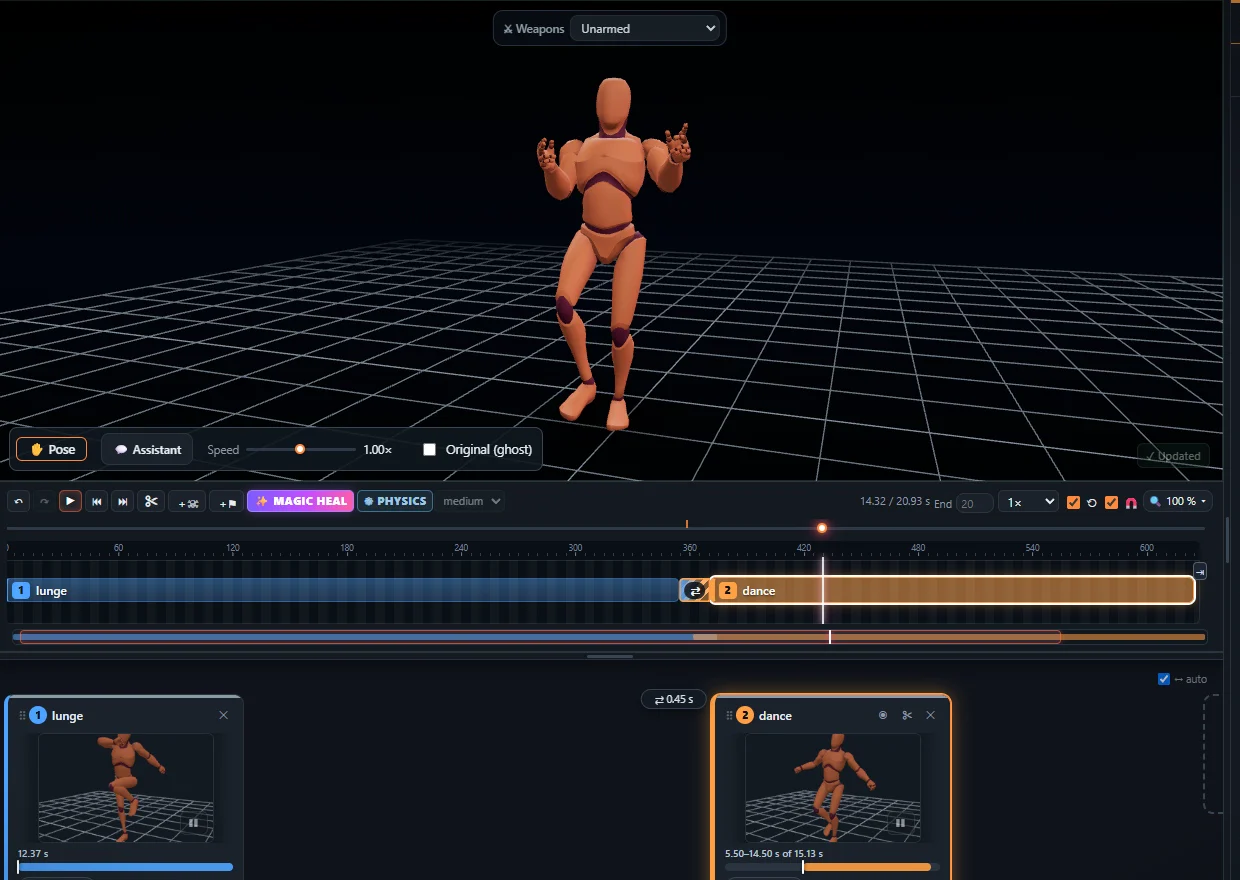
How to turn text into a 3D animation
- Open KinemIQ Studio on a computer, go to Animations and choose ✨ From text (Beta).
- Type the motion in English, for example A person throws a combo of punches.
- Choose the length – 3, 5, 8 or 10 seconds – and the quality – Fast, Balanced or Best.
- Click Create animation. The motion is put on the KinemIQ character and becomes a normal clip on the timeline.
- Edit it with sliders, posing, Magic Heal and the timeline, then click Export and choose FBX, GLB / glTF or BVH.
What text to motion does well
Your text is matched to the closest of about 950 prepared motion descriptions. The Studio shows which one it used and offers two alternatives with one click. Prompts that work well describe one clear action:
- Walking and running styles – a person walks proudly, someone runs tired
- Punches and kicks – a person throws a combo of punches, a person does a high kick
- Sword, axe and pistol actions – someone swings a sword, a person aims a pistol
- Dodges and falls – a person dodges to the side, someone falls backwards
- Dances, sports and acrobatics – someone dances happily, a person jumps
- Everyday actions and emotions – a person waves hello, someone looks sad
Runs on your own graphics card
- No server, free, unlimited. The AI motion model runs entirely in your browser on your computer’s graphics card (WebGPU).
- One download. The first time, the browser downloads the motion model once (about 600 MB) and keeps it; later visits start in seconds.
- Speed. About 14 seconds for a 5-second clip on an RTX 4060-class graphics card (Balanced). Slower graphics cards take longer – the Studio tells you.
Limits of the beta
- Needs a desktop or laptop with a recent Chrome or Edge. Phones and tablets are not supported – they show „open on a computer“.
- Your text is matched to the closest prepared motion, so not every sentence comes out exactly as written – check the motion it used and try the alternatives.
- Prompts are in English.
From prompt to game-ready file
An animation made from text is a normal KinemIQ clip: change its speed, power and pose, combine it with other clips on the timeline, fix it with one-click Magic Heal and export it with root motion or in place. Into your tool: Unity (FBX, Humanoid), Unreal Engine, Blender, GLB for the web. Have a video of the move? Turn it into motion with video to animation.
Frequently asked questions
What is text to animation (text to motion)?
Text to animation - also called text to motion, text to 3D motion, text to mocap or prompt to animation - makes a 3D character animation from a sentence. In KinemIQ Studio you type a motion in English, for example "A person throws a combo of punches", and an AI motion model creates the 3D motion on the KinemIQ character, ready to edit and export.
Is the AI text to animation free?
Yes. Creating animations from text is free and unlimited - it runs on your own graphics card, not on our server. Exporting works like every other KinemIQ clip: the first export needs no account; after that a free account is enough.
Does it need a graphics card (GPU)?
Yes. It runs in the browser on your computer's graphics card (WebGPU), in a recent Chrome or Edge on a desktop or laptop. About 14 seconds for a 5-second clip on an RTX 4060-class card (Balanced); slower cards take longer.
Does text to 3D animation work on a phone?
Not yet. Phones and tablets are not supported - open the Studio on a computer.
How big is the download?
About 600 MB, once. The browser keeps the motion model, so later visits start in seconds.
Does any text work?
Your text is matched to the closest of about 950 prepared motion descriptions - walks and runs, punches, kicks, sword, axe and pistol actions, dodges, falls, dances, sports, acrobatics, everyday actions and emotions. The Studio shows which one it used and offers two alternatives. Prompts are in English.
Which formats can I export?
FBX, GLB / glTF and BVH, with root motion or in place - for Unity, Unreal Engine, Godot and Blender.
Can I use the animations commercially?
During the public beta, yes: animations you export - also those made from text - may be used in personal and commercial projects. See the Terms.
Credits
Built with Meta Llama 3.
Motion model licensed by NVIDIA Corporation under the NVIDIA Open Model License (NVIDIA Kimodo).
All licences are listed on Sources & credits.
More with KinemIQ: Video to 3D animation · Video to motion · Free AI mocap from video · Video to FBX · Video to BVH · Martial arts animation · Ragdoll animation · Mocap from a phone video · FBX animation for Unity · Mocap for Unreal Engine · Mocap to Blender · 5-minute guide · All guides and answers