
Mocap to Blender – from a video to a Blender animation
Get mocap into Blender from an ordinary video: KinemIQ turns the person in the video into a 3D animation with AI motion capture, you export GLB, FBX or BVH and Blender imports it in one step. Free to try, nothing to install.
Make mocap for Blender – free Use my own video
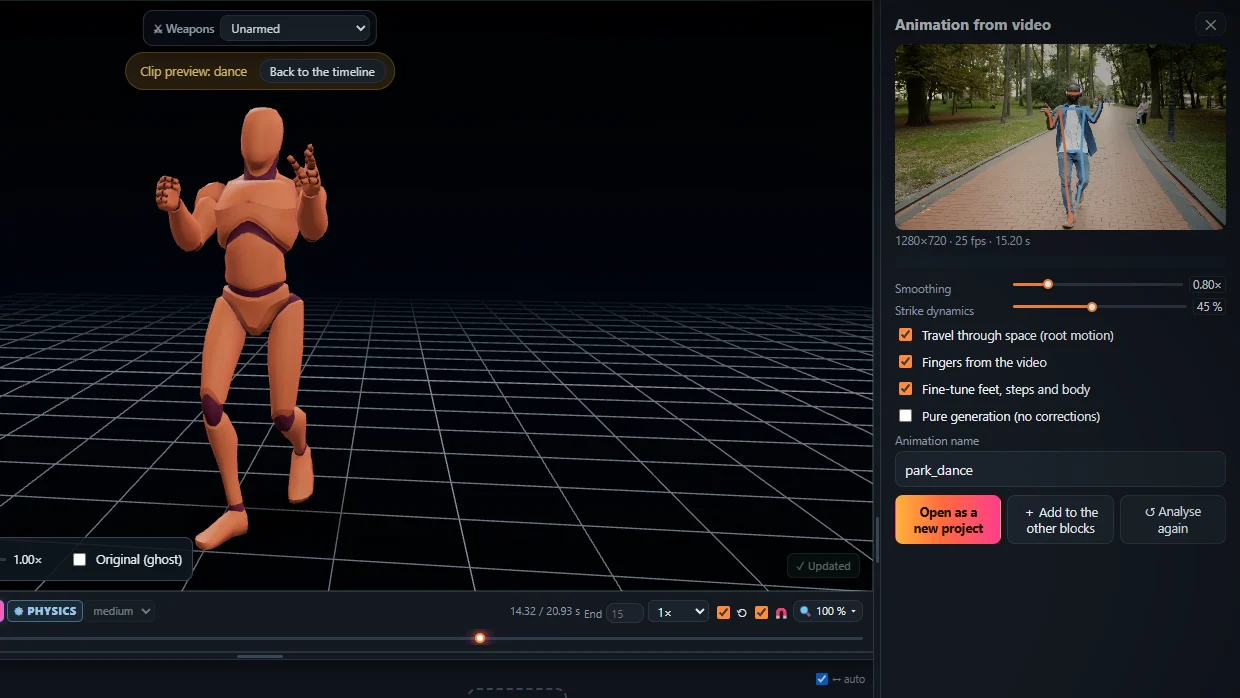
1. Make the animation
- Open the Studio, drop your video on Animation from video and press Analyse video.
- Add it to the timeline; change what you like with sliders, posing or Magic Heal.
2. Pick the format
- GLB / glTF – the character with its animation; the cleanest import into Blender.
- BVH – only the skeleton motion, for retargeting to your own rig.
- FBX – the rigged character with the animation, if you also take it to Unity or Unreal.
3. Import it into Blender
- GLB: File > Import > glTF 2.0. BVH: File > Import > Motion Capture (.bvh). FBX: File > Import > FBX.
- Set the scene frame rate (Output Properties > Frame Rate) to the one you exported – 24, 30 or 60.
- Press play. The action is in the Dope Sheet > Action Editor and the NLA.
- Your own rig: retarget with a retargeting add-on, or drive its bones with Copy Rotation constraints and bake the action (Pose > Animation > Bake Action).
Going on to a game engine? See FBX animation for Unity and mocap for Unreal Engine.
Frequently asked questions
Which format should I use for Blender?
GLB / glTF brings the character with its animation (File > Import > glTF 2.0). BVH brings only the skeleton motion (File > Import > Motion Capture). FBX works too (File > Import > FBX).
How do I put the motion on my own rig?
Import it next to your rig and retarget it with a retargeting add-on, or drive your bones with Copy Rotation constraints and bake the action.
The animation plays at the wrong speed - why?
Set the scene frame rate (Output Properties > Frame Rate) to the frames per second you chose in the export.
Do I need an add-on to import?
No. The glTF, FBX and BVH importers come with Blender.
More with KinemIQ: Video to 3D animation · Video to motion · Free AI mocap from video · Video to FBX · Video to BVH · Martial arts animation · Ragdoll animation · Mocap from a phone video · FBX animation for Unity · Mocap for Unreal Engine · Text to animation · 5-minute guide · All guides and answers