
Video to FBX – turn a video into an FBX animation
KinemIQ converts video to FBX online. AI motion capture turns a person in your video into an animated 3D character you download as FBX for Unity, Unreal, Maya or 3ds Max. Free to try, nothing to install.
Convert a video to FBX – free Use my own video
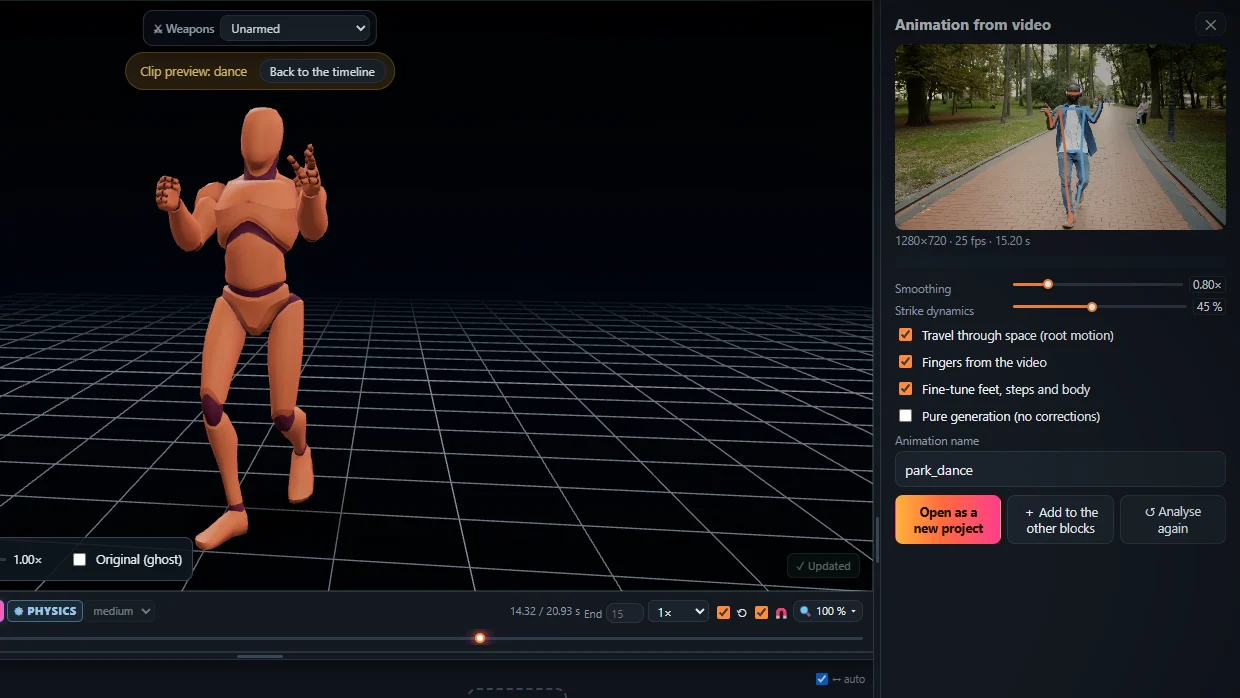
Video to FBX in four steps
- Open the Studio in a desktop browser.
- Drop the video on Animation from video, press Analyse video.
- Add it to the timeline and tweak it if you like.
- Export > FBX, root motion or in place.
What the FBX contains
- A standard humanoid rig with one key per bone per frame.
- Root motion or in place; the whole timeline or one block.
Unity and Unreal
Unity: set Rig > Animation Type to Humanoid. Unreal: import as a skeletal mesh and retarget with the IK Retargeter.
Frequently asked questions
How do I convert a video to FBX?
Open KinemIQ Studio, drop the video on Animation from video and press Analyse video. When the 3D animation is on the timeline, press Export, choose FBX and download the file - all in the browser.
Does the FBX work in Unity and Unreal Engine?
Yes. The FBX holds a rigged character with the animation. In Unity set the rig to Humanoid to play it on any humanoid character; Unreal Engine imports it as a skeletal mesh with an animation sequence.
Root motion or in place?
Both. With root motion the character travels through space in the file (on the root bone, with or without rotation, or on the pelvis); in place keeps it over the start - height and turning stay.
Can I send the animation straight to Unity?
Yes. Besides the FBX file, KinemIQ can send the animation straight into an open Unity project as a Humanoid clip.
More with KinemIQ: Video to 3D animation · Video to motion · Free AI mocap from video · Video to BVH · Martial arts animation · Ragdoll animation · Mocap from a phone video · FBX animation for Unity · Mocap for Unreal Engine · Mocap to Blender · Text to animation · 5-minute guide · All guides and answers