
Video to motion – extract 3D motion from any video with AI
KinemIQ extracts 3D motion from a video of a person – body, hands and feet – as a clean skeleton animation. In your browser, no suit or markers. Download FBX, BVH or GLB for any character.
Extract motion from a video – free Use my own video
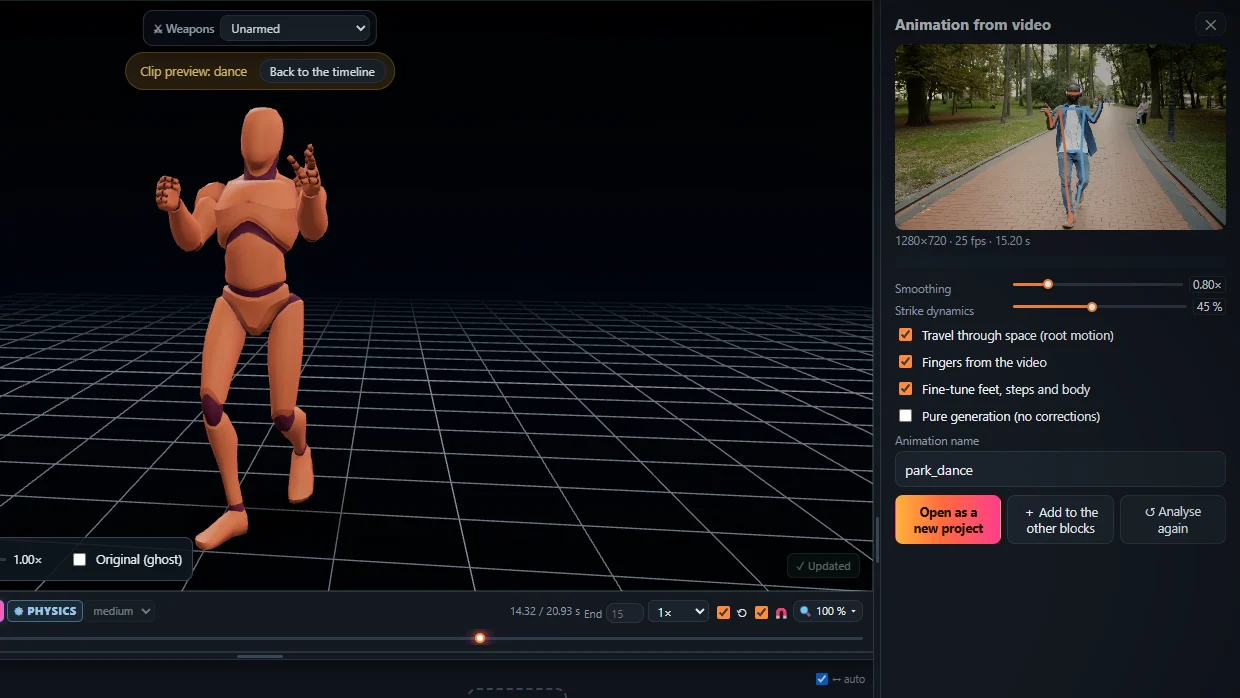
From pixels to motion data
KinemIQ lifts the pose into 3D and solves a full skeleton with the root moving through space – one rotation per bone per frame, ready to retarget.
Clean, usable motion
- No jitter – fast kicks and punches keep their snap.
- Planted feet – nothing slides, sinks or floats.
- Human joints – every joint within a real body’s range.
Five steps
- Open the Studio.
- Drop the video on Animation from video.
- Press Analyse video.
- Adjust if you like.
- Export BVH, FBX or GLB / glTF.
Private by design: the motion is extracted on your computer, the video is never uploaded.
Frequently asked questions
What is video to motion?
Video to motion means taking the movement of a person in an ordinary video and turning it into 3D motion data - a skeleton animation you can put on any character. KinemIQ does it in the browser with AI motion capture, no suit and no markers.
Which motion file do I get?
FBX, BVH or GLB / glTF, with root motion or in place. BVH is plain motion data for Blender, MotionBuilder or retargeting; FBX and GLB carry the motion on a rigged character for Unity, Unreal Engine or Godot.
Is the extracted motion clean?
KinemIQ smooths the jitter of the raw detection, keeps the joints inside a human range, plants the feet that stand and keeps the body on the floor - so the motion is usable right away. What you still want different you change with sliders, posing or Magic Heal.
Is my video uploaded?
No. The motion is extracted in your own browser; the video stays on your computer.
More with KinemIQ: Video to 3D animation · Free AI mocap from video · Video to FBX · Video to BVH · Martial arts animation · Ragdoll animation · Mocap from a phone video · FBX animation for Unity · Mocap for Unreal Engine · Mocap to Blender · Text to animation · 5-minute guide · All guides and answers