
Video to 3D animation – AI motion capture from any video, online
KinemIQ turns a video into a 3D character animation, online and free to try. One person on a phone clip is enough – no suit, no markers, nothing to install. Edit it, then export FBX, GLB or BVH for Unity, Unreal or Blender.
Turn a video into animation – free Use my own video
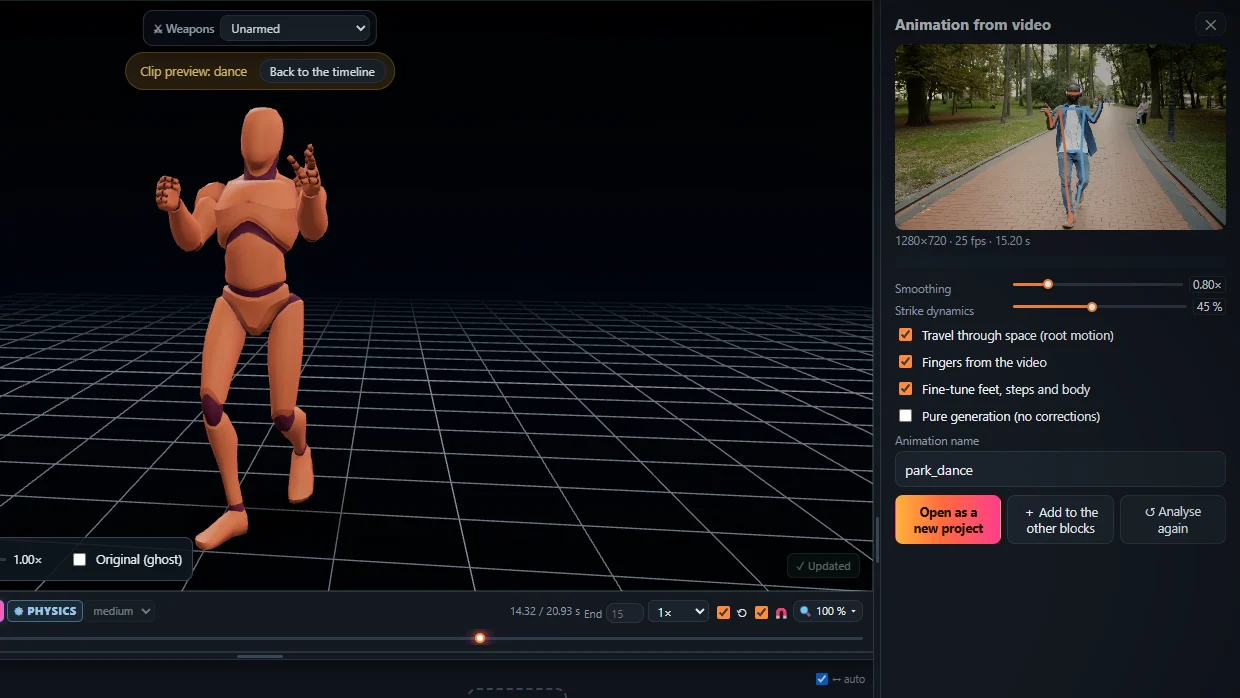
Motion capture from an ordinary video
KinemIQ reads the body, hands and fingers frame by frame and rebuilds the movement on a rigged 3D character. It runs in your browser – the video never leaves your computer.
Natural, physical motion
- Human joints – no knees bending backwards, no twisted limbs.
- Weight on the feet – standing feet stay planted, nothing floats or sinks.
- Real landings – jumps land into a crouch, palms carry handsprings.
How it works
- Open the Studio and drop your video on Animation from video.
- Press Analyse video.
- Edit – speed, poses, impacts, Magic Heal.
- Export FBX, GLB / glTF or BVH.
Best results: one person, whole body in the frame, a steady camera. Works for martial arts, dance, sport and acrobatics.
Frequently asked questions
How do I turn a video into a 3D animation?
Open KinemIQ Studio in your browser, drop a video with one person in it into Animations, and press Analyse. KinemIQ reads the body frame by frame and puts the motion on a 3D character - then you edit it on the timeline and export it as FBX, GLB or BVH.
Do I need a mocap suit or markers?
No. It is markerless motion capture from an ordinary video - filmed on a phone or downloaded. The analysis runs in your own browser; the video is not uploaded.
Does the motion look natural?
Yes - it is made to: the joints stay inside a human body's range, feet and palms hold the floor and carry the weight, landings absorb the impact and bystanders in the video are left out. Anything you still want different, you change with sliders, posing or one-click Magic Heal.
Can I use the animation in Unity or Unreal Engine?
Yes. Export FBX, GLB / glTF or BVH with root motion or in place - it plays in Unity (Generic or Humanoid), Unreal Engine, Godot, Blender or any tool that reads these formats.
More with KinemIQ: Video to motion · Free AI mocap from video · Video to FBX · Video to BVH · Martial arts animation · Ragdoll animation · Mocap from a phone video · FBX animation for Unity · Mocap for Unreal Engine · Mocap to Blender · Text to animation · 5-minute guide · All guides and answers