
How to animate a 3D character from a video
To animate a 3D character from a video, use AI motion capture: it reads the body of the person in the video frame by frame and puts the same motion on a rigged 3D character. In KinemIQ that takes four steps in your browser.
Try it free in your browser Use my own video
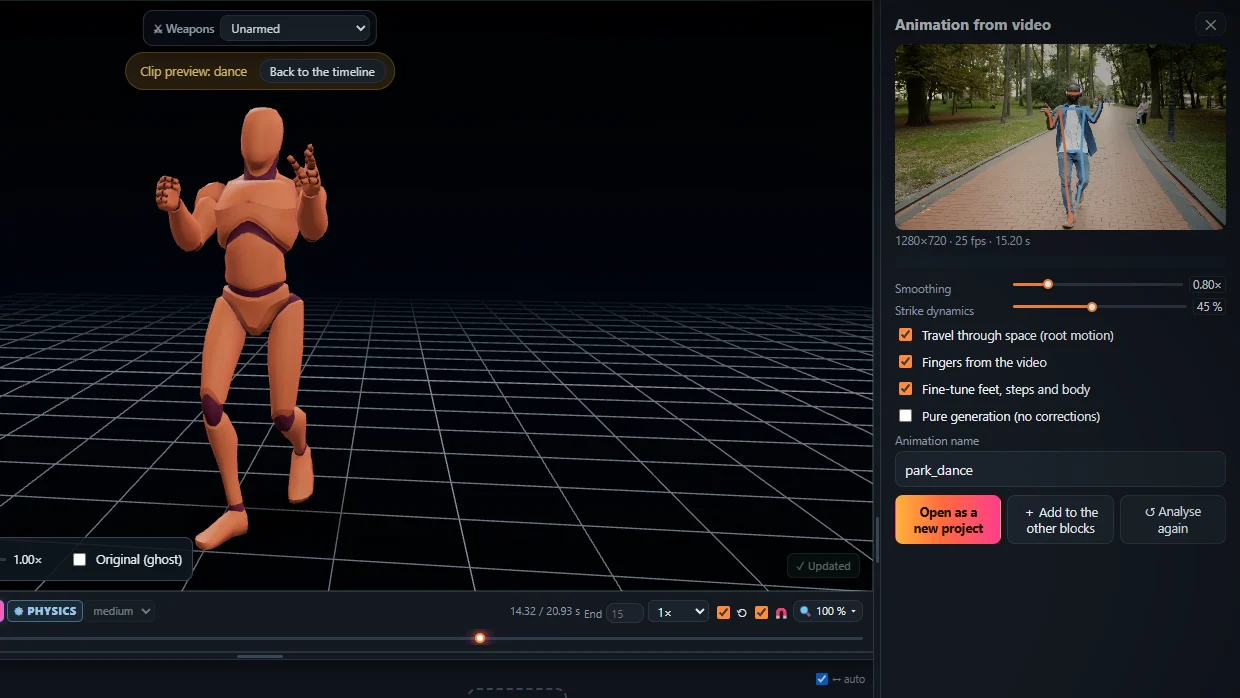
Four steps
- Film – one person, the whole body, a steady camera.
- Analyse – drop the video on Animation from video and press Analyse video.
- Edit – trim, change speed and poses, add impacts, press Magic Heal.
- Export – FBX, GLB or BVH, root motion or in place.
Put it on your own character
The exported animation uses a standard humanoid skeleton, so it can be retargeted: in Unity set both rigs to Humanoid, in Unreal use the IK Retargeter, in Blender a retargeting add-on. See retargeting.
Frequently asked questions
What video works best?
One person, the whole body in the frame, good light and a camera that does not move much. 60 fps helps for fast moves.
Can it animate hands and fingers?
Yes, with Hands and fingers turned on the wrists and fingers follow the video too.
Do I need to know animation?
No. The motion comes from the video; the editor only helps you change what you want.
More with KinemIQ: Video to 3D animation · Video to motion · Free AI mocap from video · Video to FBX · Video to BVH · Martial arts animation · Ragdoll animation · Mocap from a phone video · FBX animation for Unity · Mocap for Unreal Engine · Mocap to Blender · Text to animation · 5-minute guide · All guides and answers