
Motion capture without a suit – how to do it with a video
Yes – you can do motion capture without a suit or markers. Film the move with any camera, even a phone, and AI motion capture turns the person in the video into a 3D character animation. KinemIQ does it in your browser, free to try.
Try it free in your browser Use my own video
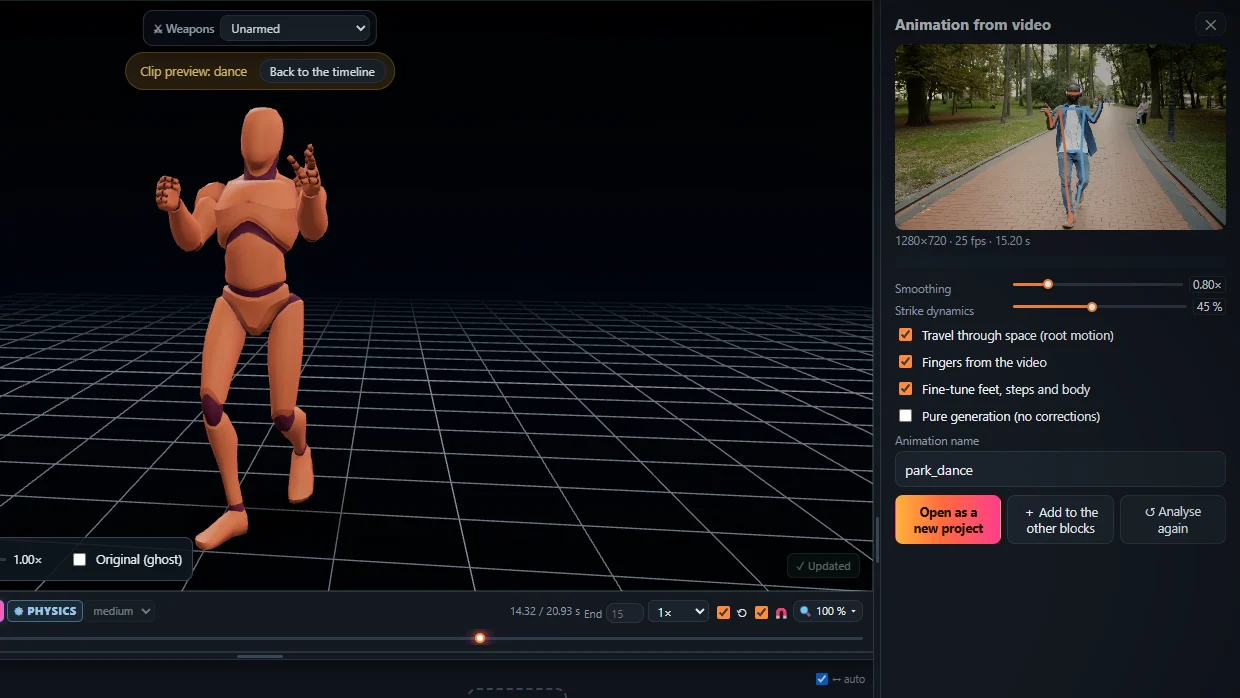
How it works
- Film one person, whole body in the frame, steady camera.
- Drop the video into KinemIQ Studio and press Analyse video.
- The AI finds the body in every frame and rebuilds it as 3D motion with weight on the feet.
- Edit it and export FBX, GLB or BVH.
Suit or video?
- Suit / optical studio – best for very fast or hidden motion, costs money and setup time.
- AI from video – no hardware, any place, any time; enough for most game and film motion.
Frequently asked questions
Do I need special cameras?
No. One ordinary camera is enough - a phone, a webcam or a video you already have.
Is it accurate enough for games?
For most game motion, yes: the joints stay in a human range, the feet plant and carry the weight. What you want different, you fix in the editor before you export.
Is my video uploaded?
No. KinemIQ analyses the video in your own browser; it stays on your computer.
More with KinemIQ: Video to 3D animation · Video to motion · Free AI mocap from video · Video to FBX · Video to BVH · Martial arts animation · Ragdoll animation · Mocap from a phone video · FBX animation for Unity · Mocap for Unreal Engine · Mocap to Blender · Text to animation · 5-minute guide · All guides and answers